Windows 11 24H2 End of Support: Is Your Office PC Still Protected?
Plenty of business laptops running Windows 11 Pro stopped getting security fixes this week, even though they look perfectly up to date. Here's how to spot them and get them moving again.
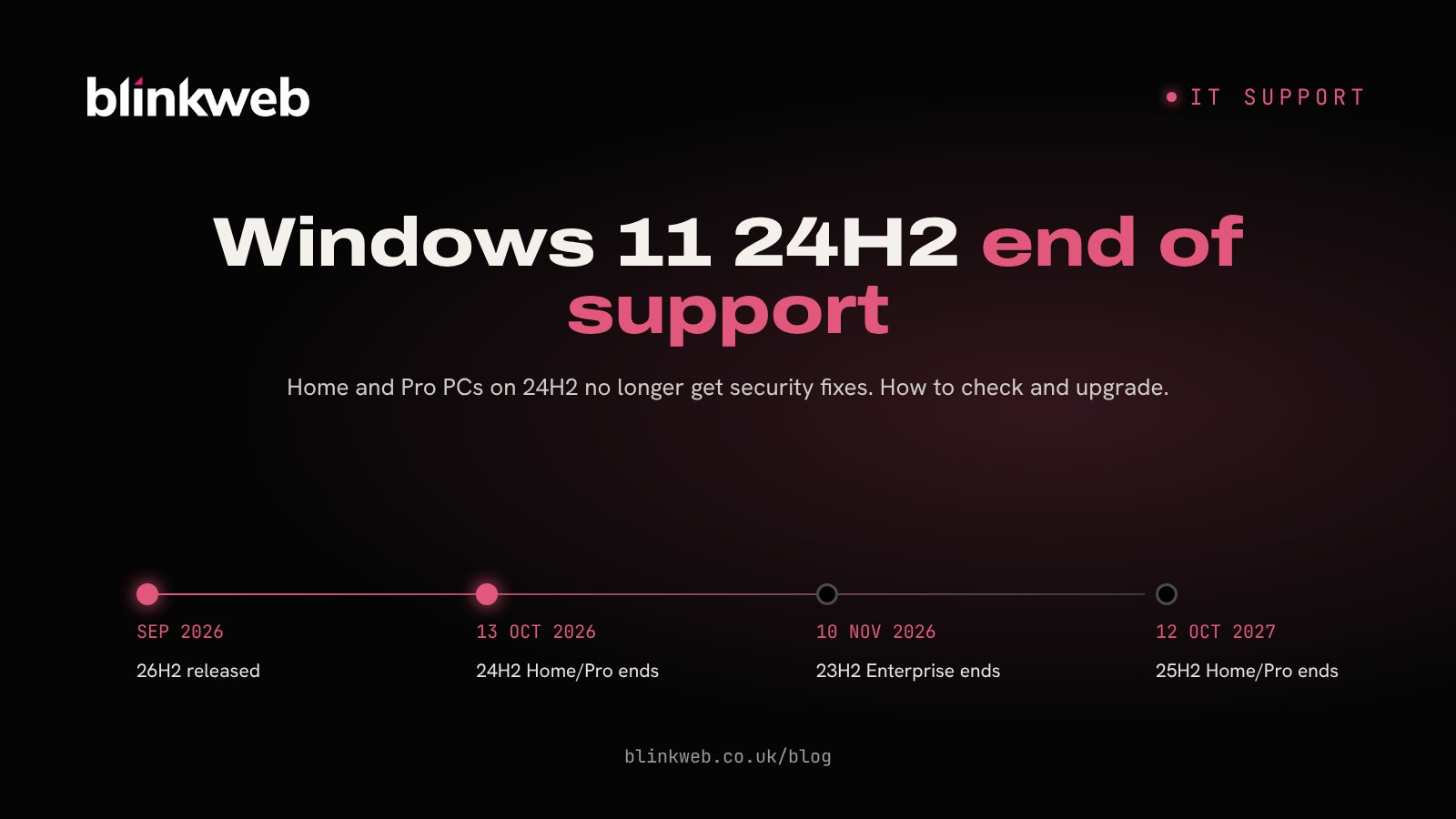
Windows 11 doesn't keep a PC safe forever on its own. Each yearly version has its own shelf life, and the Windows 11 24H2 end of support date for Home and Pro editions was Tuesday 13 October 2026. Most business laptops and desktops bought in the last couple of years run Windows 11 Pro, so if any of yours are still sitting on version 24H2, they've now had their last monthly security update.
The fix is usually free and fairly quick. The tricky part is knowing which machines need it, because nothing on screen tells you they've dropped out of support.
What changed on 13 October?
Microsoft posted a notice on its Windows release health pages confirming that 24H2 Home and Pro had reached the end of updates, alongside the much older Windows 10 Enterprise LTSB 2016, as reported by BleepingComputer.
The facts in brief:
- Last update: the October 2026 security update was the final one for 24H2 Home and Pro.
- No paid extension: unlike Windows 10, there are no Extended Security Updates you can buy for 24H2 Home or Pro, according to TechRepublic. The only route is a newer version of Windows 11.
- Enterprise and Education editions of 24H2 carry on receiving fixes until 12 October 2027.
Who's affected?
Any business running Windows 11 Home or Pro that hasn't moved on from version 24H2. That's most likely if:
- updates are paused, deferred or managed by an old policy nobody has looked at in a while
- a PC rarely gets restarted, so feature updates never finish installing
- a laptop spends weeks in a drawer or out on site with a patchy connection
- a machine was set up by a previous IT provider and left alone since
Sole traders working from a single laptop are just as exposed as a 50 person office. The difference is that a larger team has more machines where one can quietly slip through.
Why does this matter right now?
The timing is awkward. October's Patch Tuesday, released the same day 24H2 lost support, was the largest on record, with over 1,400 vulnerabilities fixed across Microsoft products. The exact total varies between 1,407 and 1,413 depending on who's counting, per Tenable and SecurityWeek.
One of those flaws, CVE-2026-96951, was already being used in real attacks. It lets a booby-trapped file get round the Mark of the Web, the label Windows puts on downloaded files so it can show a warning before they open. The attack relies on someone opening a crafted file sent by email or instant message, which is exactly how many small business breaches begin.
A 24H2 PC that installed October's update has this fix. But from November onwards, any new flaws will stay open on that machine for good.
How to check which version a PC is running
This takes under a minute per machine:
- Press the Windows key + R, type
winverand press Enter. - The box that opens shows the version, such as "Version 24H2".
- Alternatively, go to Settings > System > About and look under Windows specifications.
Make a quick list of every PC and laptop, including the ones people take home. If you have a lot of machines, Microsoft Intune or your IT provider's management tools can pull this into one report.
Upgrading from Windows 11 24H2
Microsoft's recommended destination is Windows 11 version 26H2, the 2026 Update, which arrived in September 2026. Because it's delivered as a small enablement package on top of the existing system, the upgrade is far lighter than a full reinstall: it downloads, installs and finishes with a single restart, as gHacks explains. Version 25H2 is also still supported for Home and Pro until 12 October 2027.
Steps for each PC
- Back up anything important first, or check your cloud backup is working.
- Open Settings > Windows Update.
- Turn on Get the latest updates as soon as they're available.
- Select Check for updates and install the 26H2 feature update if it's offered.
- Restart, then run
winveragain to confirm the new version.
Microsoft is releasing 26H2 in stages and widening it over the coming months, so some PCs may not see it straight away. If a machine isn't offered either 25H2 or 26H2, there may be a blocking policy, a compatibility hold or a hardware issue worth investigating.
Before you roll it out across the team
- Test one machine with your key software: accounts packages, VPN, antivirus and any line of business apps.
- Upgrade in small batches rather than all at once.
- Remind staff to save their work and restart when asked.
Other dates for your IT diary
- 10 November 2026: Windows 11 23H2 Enterprise, Education and IoT Enterprise stop getting security updates.
- 12 October 2027: support ends for Windows 11 25H2 Home and Pro and for 24H2 Enterprise and Education.
Last week we covered the rising cost of Windows 10 Extended Security Updates, so if you still have Windows 10 machines, it's worth tackling both jobs together.
How Blink Web can help
Keeping track of versions across a whole team is the kind of job that gets forgotten until something goes wrong. With 30+ years of combined experience supporting UK businesses, from sole traders to larger teams, we can take it off your plate:
- Managed IT helpdesk: we watch update status on every device and move them on before support ends.
- Ad-hoc IT support: a one-off visit or remote session to check and upgrade your PCs.
- Managed cyber security: endpoint protection and monitoring that catches what slips through.
- Security awareness training: helps staff spot the dodgy attachments that attacks like this rely on.
Not sure where your PCs stand? Get in touch and we'll run a quick check and tell you exactly what needs doing.
Sources: BleepingComputer: Windows 11 24H2 Home and Pro reached end of support, gHacks: Windows 11 24H2 Home and Pro reach end of support, TechRepublic: Windows 11 24H2 Home and Pro support ends 13 October, Tenable: Microsoft's October 2026 Patch Tuesday, SecurityWeek: Microsoft patches record 1,413 vulnerabilities, BleepingComputer: October 2026 Patch Tuesday.