Synology NAS Ransomware: Update DSM Before Your Files Are Locked
Attackers are encrypting files on Synology NAS boxes that have missed their DSM updates. Here's how to tell if yours is at risk, and how to make sure a locked NAS doesn't mean lost data.
If your office keeps its shared files or backups on a Synology NAS, now is the time to check it's up to date. Synology NAS ransomware attacks are locking files on devices that have been left on older versions of DSM, the operating system that runs them, and on 29 October Synology publicly urged every affected owner to update straight away.
A NAS (network attached storage) is the small box in the comms cupboard that quietly holds the shared drive, scanned documents, photos or the nightly backup. Because it sits in the background and "just works", it's often the one device nobody has updated in years. That's exactly what the attackers are counting on.
What's going on?
Synology says criminals are exploiting a vulnerability it fixed in December 2024 to break into NAS devices running out of date DSM, then encrypting the data and demanding a ransom. It points owners to its security advisory Synology-SA-24:20, which rated the main flaw (CVE-2024-10441) as critical, with a score of 9.8 out of 10. It could let someone run code on the device remotely without logging in.
Security researchers at Qihoo 360, whose findings are covered by NASCompares and Gridinsoft, say they've been asked to help with infected Synology devices throughout October. Their account differs slightly from Synology's: they link the cases they saw to two newer flaws, fixed in Synology's September 2026 update (advisory SA-26:13). Either way, the answer is the same. A NAS running current DSM closes both routes in.
How to spot an infection
The ransomware, which researchers call C3RB3R (a spin-off of the older Cerber ransomware), renames files with a .L0CK3D extension (with a zero, not a letter O) and leaves a ransom note called read-me3.txt. If you see either, treat it as an incident, not an IT niggle.
Is your Synology NAS at risk?
You're most at risk if any of these sound familiar:
- Nobody has updated DSM for a while. The December 2024 fixes need DSM 7.2.2-72806-1, 7.2.1-69057-6, 7.2-64570-4, 7.1.1-42962-7 or 6.2.4-25556-8 as a minimum, and later updates have fixed more since.
- You can reach the NAS from outside the office because a port on your router has been opened so you can get to files from home.
- It's an older model that no longer gets DSM updates.
- The NAS is your only backup. If it gets encrypted, so does your safety net.
Seven checks to make this week
You don't need to be an IT expert to start these. Where something feels unfamiliar, your IT support provider can do it for you.
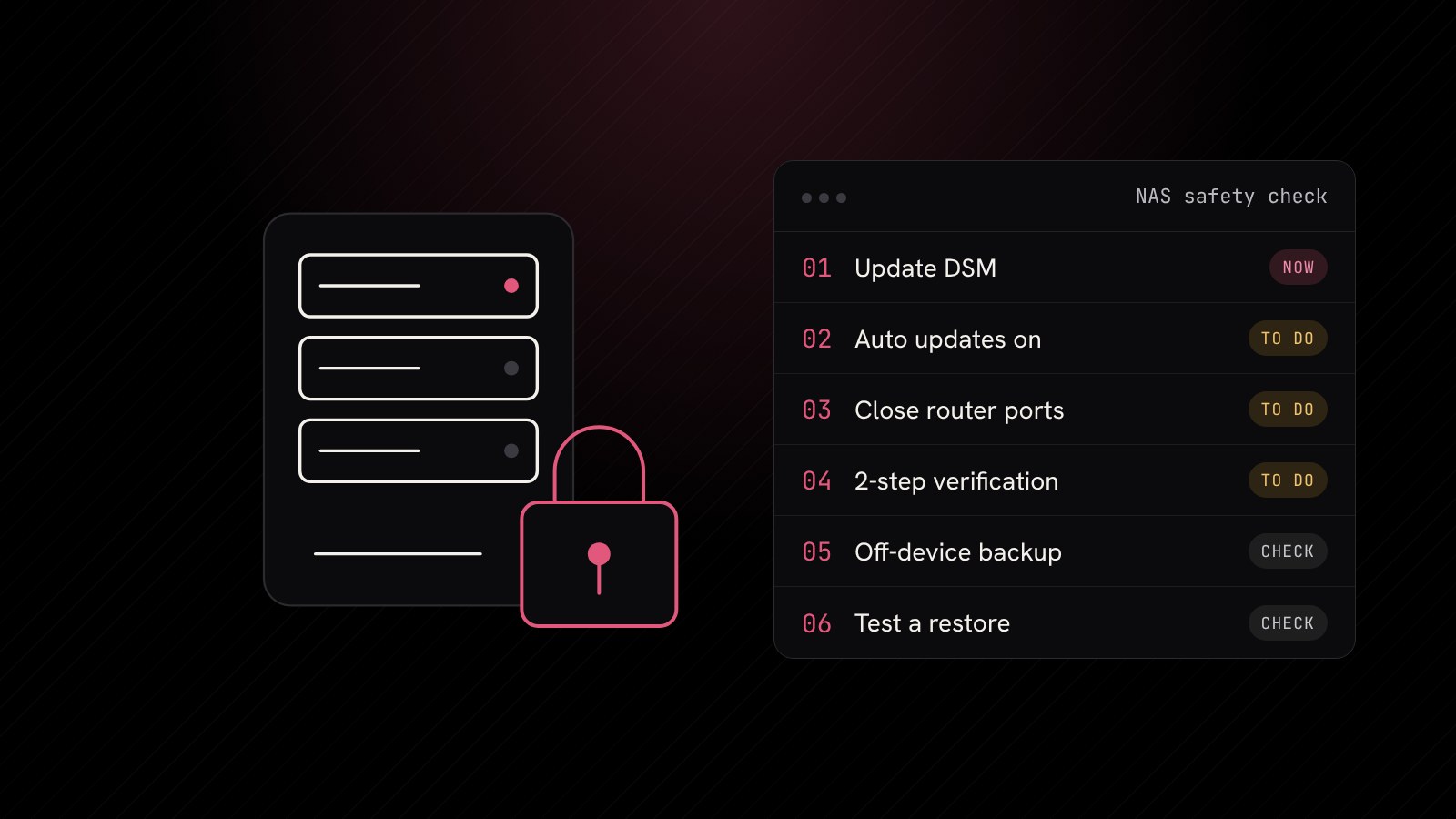
- Check your DSM version. In DSM, open Control Panel, then Update & Restore. Install the latest version offered for your model.
- Turn on automatic updates. Synology recommends this so you aren't relying on someone remembering. Pick a time outside working hours.
- Stop exposing the admin login to the internet. Remove router port forwards that point at DSM and use a VPN for remote access instead. We cover safer remote access on our networks and Wi-Fi page.
- Tidy up accounts. Disable the built-in admin account, give each person their own login with a strong, unique password and switch on 2-step verification.
- Switch off what you don't use. Packages and services such as SSH that nobody needs are just extra doors.
- Keep a copy somewhere else. Snapshots on the NAS help, but you also need a backup that lives off the device, ideally offline or immutable (meaning it can't be changed or deleted for a set time). The NCSC's guidance on backing up your data is a good plain English starting point.
- Test a restore. Pick a folder and bring it back from the backup. A backup you've never restored from is only a hope.
If you've already been hit
Disconnect the NAS from the network straight away so the encryption can't spread, but don't wipe it. Keep the ransom note and make a note of the DSM version, then get expert help. Updating DSM afterwards stops further attacks, but it won't unlock files that are already encrypted, which is why the off-device backup in check 6 matters so much. Our incident response team can help you contain it and recover.
Why a NAS shouldn't be your only backup
Many businesses bought a NAS as "the backup", which made sense at the time. The trouble is that ransomware goes looking for backups first, and anything permanently connected to your network is within reach. A sensible setup for most businesses, from sole traders to larger teams, follows a simple rule: at least one copy of important data stored separately from your everyday systems, and checked regularly.
This is the second backup story in as many weeks. Last week we looked at Microsoft 365 backup security after the ConnectWise incident, and the lesson is similar: the tools that protect your data need protecting too. Separately, if your NAS runs web apps such as WordPress through Web Station, our post on the critical PHP security flaws is worth a read, as Synology has also been releasing PHP fixes for its packages.
How Blink Web can help
With 30+ years of combined experience, we look after IT and backups for UK businesses of all sizes:
- Backup and recovery: server, device and Microsoft 365 backups you can actually restore, kept away from your main network.
- Managed IT helpdesk: we keep devices like your NAS patched, so updates don't depend on someone remembering.
- Ad-hoc IT support: a one-off NAS health check and update, with no contract.
- Managed cyber security: monitoring that spots unusual activity before it becomes a crisis.
Not sure when your NAS was last updated? Get in touch and we'll check it with you.
Sources: Synology: Synology urges users to update DSM following ransomware attacks on outdated DSM versions, Synology-SA-24:20 security advisory, NASCompares: Synology LOCK3D / C3RB3R ransomware attack, Gridinsoft: Synology NAS ransomware locks files as sources disagree on entry, NCSC: Backing up your data.