WordPress Updater Vulnerability Under Attack: Get to 7.1.4 Safely
Attackers are now going after a flaw in the way WordPress installs its own updates. Here's how to check your site, close the gap and get on to 7.1.4 without opening the door while you do it.
If your business runs a WordPress website, check today that it's on version 7.1.4. A WordPress updater vulnerability fixed on 28 October is now being used in real attacks, and the US Cybersecurity and Infrastructure Security Agency (CISA) added it to its list of actively exploited flaws on Tuesday 3 November. The unusual part is where the weakness sits: in the process WordPress uses to update itself.
That means the advice is slightly different from a normal "just press update" week, so it's worth five minutes of your time whether you run a one-page site for a sole trader or a busy online shop for a larger team.
What's new since our last WordPress update post?
Last month we covered the WordPress 7.1.3 security update, which fixed seven flaws that mostly needed someone to be logged in. Version 7.1.4 is a bigger release and, a week after it came out, one of its fixes has moved from "theoretical" to "being tried against live websites".
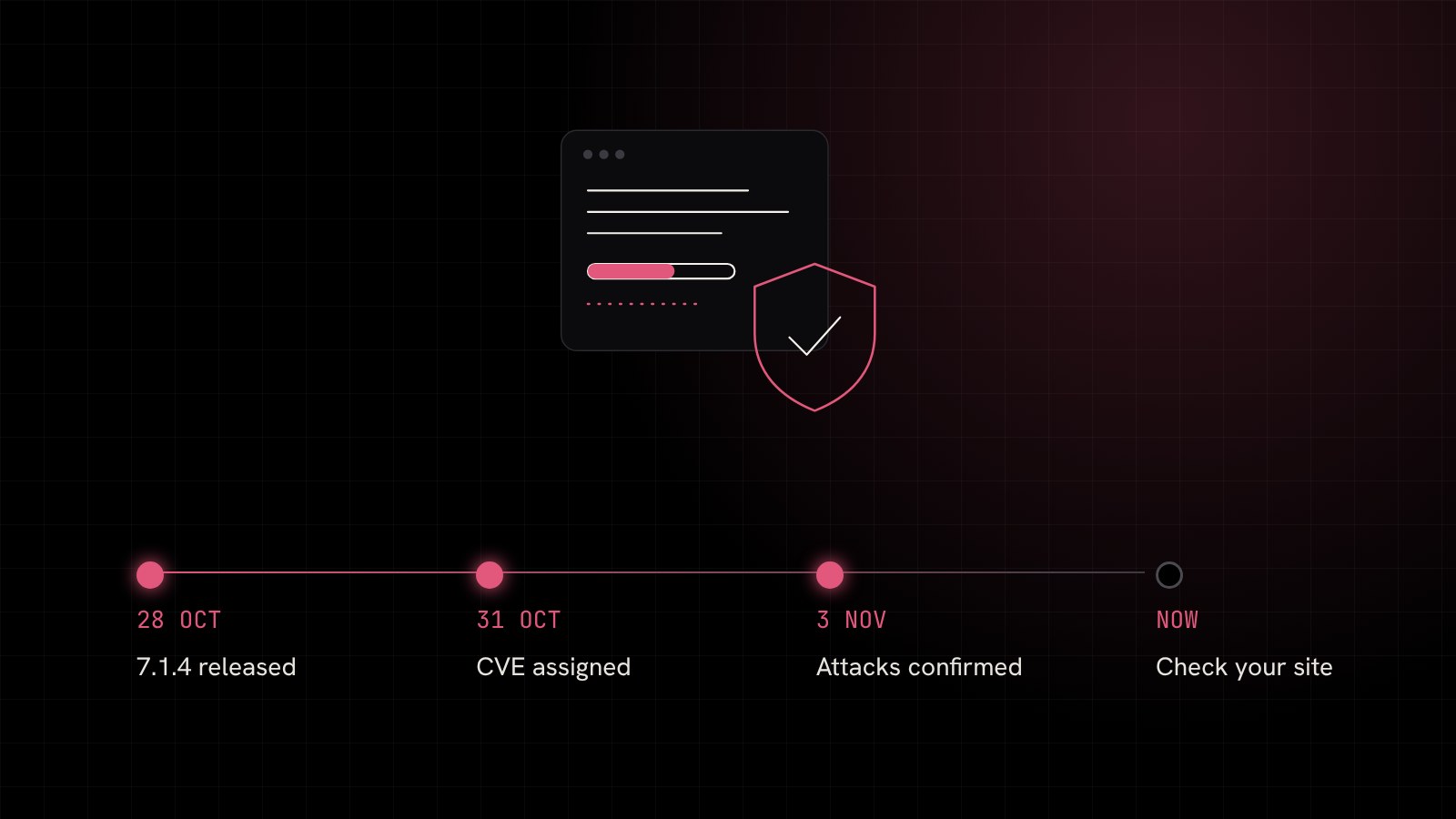
Here's the timeline so far:
- Wednesday 28 October: WordPress 7.1.4 released, with fixes also sent to every supported older branch back to 4.7.
- 31 October: the updater flaw is given the ID CVE-2026-119977.
- Tuesday 3 November: CISA confirms it is being exploited and adds it to its Known Exploited Vulnerabilities catalogue.
- Friday 6 November: the deadline CISA gave US federal agencies to patch.
Security firm Wordfence reported blocking 13,095 attempts to use the flaw in a single 24 hour period, according to BleepingComputer. No named websites have been reported as compromised so far, but that level of probing tells you attackers are actively looking for sites to try it on.
How does the WordPress updater vulnerability work?
When WordPress installs a core update, it first unpacks the new files into a temporary folder at wp-content/upgrade/, then copies them over the live site. On most sites that temporary folder can be reached from the web, and its location is easy to predict.
The researcher who found the problem, Umut Bayram of Picus Security, showed that for the few seconds those files sit there, an attacker can load the WordPress setup screen inside the temporary copy. Because that copy doesn't see your real configuration, it behaves like a brand new install and asks for database details. If the attacker gets in at the right moment, their own settings file can end up copied over yours. From there they can create an administrator account and run their own code on your hosting.
It is rated 8.1 out of 10 for severity. The attack needs no login, but it only works while an update is actually running, so it's a race against the clock rather than an open door.
Who's affected?
Any WordPress site on a version before 7.1.4, or before the matching fix on an older branch. Sites on WordPress 4.6 or older get no fix at all and need a proper upgrade.
Why is updating itself the risky moment?
This is the twist. Picus points out that the jump from an unpatched version to 7.1.4 is carried out by the old, unpatched updater. So the update that fixes the problem briefly runs through the same window, and automatic background updates are no different. That doesn't mean you should wait. It means you should close the window first.
What should you do now?
Work through these in order:
- Check your version. Log in and look at Dashboard, then Updates. If it already says 7.1.4 (or the latest version on your branch), skip to step 5.
- Take a fresh backup of your files and database, and make sure it's stored away from your hosting account.
- Block web access to the upgrade folder. Ask your host or developer to deny public access to
/wp-content/upgrade/. On Apache hosting this is a short rule in the main.htaccessfile, and on Nginx a one-line location block. Visitingyoursite.co.uk/wp-content/upgrade/should then return a "403 Forbidden" error. - Update WordPress, then your plugins and theme. With the folder blocked, run the update. If you'd rather avoid the built-in updater for this one, a developer can copy the 7.1.4 files into place manually.
- Look for signs anything happened. Check Users for administrator accounts you don't recognise, look for plugins you didn't install and ask your host whether your
wp-config.phpfile changed recently. If anything looks wrong, don't delete it, get help. - Leave the block in place. It does no harm and protects future updates too.
The other fixes in 7.1.4 matter as well. Patchstack counts 22 vulnerabilities across 17 advisories, including ten stored cross-site scripting issues that mostly need a Contributor login or higher. If several people log in to your site, or you've given access to a former agency or freelancer, now is a good time to tidy up user accounts.
Why this matters for UK businesses
Your website is often the first thing a customer sees, and a hacked one can redirect visitors, send spam from your domain or get your site flagged by Google. Recovering usually costs far more than keeping things patched. We've written before about hackers exploiting outdated WordPress sites, and the pattern hasn't changed: attackers move quickly once a flaw is public, and sites that nobody is watching are the easiest targets.
As the WordPress team put it in its release notes, "Because this is a security release, it is recommended that you update your sites immediately."
How Blink Web can help
With 30+ years of combined experience, we look after websites for UK businesses, from sole traders to larger teams:
- WordPress maintenance: we handle core, plugin and theme updates safely, with backups and monitoring, from £28.50 a month.
- Cloud web hosting: UK hosting with free SSL and backups, and a team who can add server rules like the upgrade folder block for you.
- Free website security check: a quick look at your site's version, headers and visible weak spots.
- Incident response: if you think your site has already been tampered with, we'll help you contain it and recover.
Not sure which version your site is running, or who looks after its updates? Get in touch and we'll check it with you.
Sources: BleepingComputer: CISA flags WordPress RCE flaw as actively exploited in attacks, Picus Security: CVE-2026-119977, when updating WordPress becomes the vulnerability, Patchstack: WordPress 7.1.4 security release, Tech Insider: WordPress CVE-2026-119977 and the CISA deadline.