Can AI Build Me a Website? Yes, but Here's What It Won't Tell You
AI can build a website in minutes. But a website is more than the pages you see. Here's what still needs doing once the AI has finished: hosting, security, updates and the technical debt you take on.
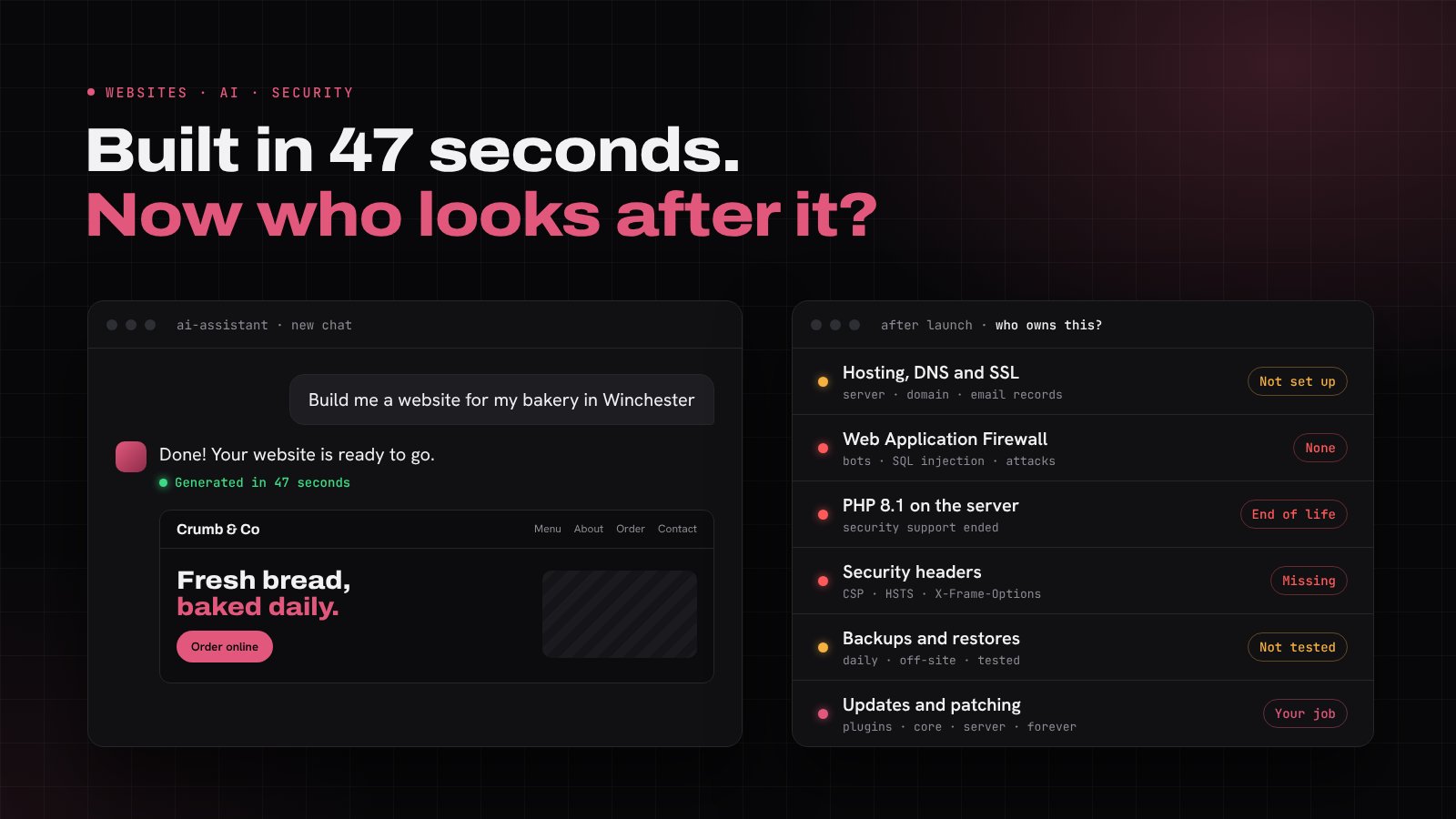
The short answer is yes. AI tools can now build a working website in minutes. Describe your business, pick a style and you'll have pages, copy, images and code before your coffee goes cold.
We build websites for a living, so you might expect us to tell you otherwise. We won't. We use AI tools ourselves every day and they're genuinely impressive. But after more than 16 years of designing, hosting and securing websites for UK businesses, we also know that the bit AI does brilliantly is the bit that was always the quickest part of the job.
A website isn't a document you finish and file away. It's a piece of software running on a server, connected to the internet, 24 hours a day. Someone has to look after it. So the better question isn't "can AI build me a website?" but "who's going to run it once it's built?"
What AI does really well
Credit where it's due. AI is excellent at:
- Getting you started quickly. A first draft of a homepage, a layout or a colour scheme in minutes rather than weeks.
- Prototypes and ideas. Trying out a few different directions before you commit to one.
- Writing first drafts. Page copy, product descriptions and FAQs that you can then edit into your own voice. We wrote about the benefits and challenges of AI written content a while back and most of it still stands.
- Simple, short-lived pages. A landing page to test an idea or a one-off event page.
If that's all you need, AI may well be enough. For a business website that customers rely on, takes enquiries or handles payments, there's a lot more to it.
The parts you don't see
1. Hosting and how it all fits together
AI can hand you the files. It can't decide where they live or make sure they're set up properly. To get a site online you need:
- Hosting, and the right kind for your site. Shared hosting, a VPS or a static host all suit different jobs. (Not sure which? Here's when to choose a VPS over shared hosting.)
- A domain and DNS set up correctly, including the records that keep your email working.
- An SSL certificate that renews itself, so visitors never see a "Not secure" warning.
- Email that actually arrives. Contact forms often send email from the server, and without SPF, DKIM and DMARC records those messages land in spam or vanish altogether. Many cloud providers block normal server email entirely, so forms need a proper sending service.
- A server stack with the right PHP version, database, caching and file permissions.
None of this is especially hard if you understand the architecture. The problem is that if you don't, you can't tell whether what the AI produced is right. AI tools are very confident, even when they're wrong, and they'll happily give you instructions for a setup that doesn't match yours.
2. Has it been built securely?
This is the big one. A website that looks finished can still be wide open.
In 2025, security firm Veracode tested code from over 100 AI models and found that 45% of the code samples introduced known security flaws, including some of the most common ways websites get attacked. AI writes code that works. It doesn't always write code that's safe.
Questions worth asking about any AI-built site:
- Are the forms protected? Every contact form is a door into your site. Inputs should be checked and cleaned, protected against spam bots and limited so nobody can send thousands of requests a minute.
- Are any passwords or API keys in the code? AI often puts secret keys straight into files that end up publicly visible or uploaded to a code repository.
- Is there a Web Application Firewall (WAF)? A WAF sits in front of your site and blocks malicious traffic, such as SQL injection attempts, bad bots and known attack patterns, before it ever reaches your code. AI won't set one up for you, because it isn't part of the website. It's part of the hosting and network around it.
- Are security headers in place? These tell browsers how to behave safely with your site. We explain them in what are HTTP security headers and why should you implement them.
- Is the admin area locked down? Strong passwords, multi-factor authentication and no default "admin" usernames.
- Are the packages and plugins real and up to date? AI sometimes suggests outdated libraries, or even ones that don't exist, which attackers have learned to take advantage of by publishing malicious packages under those made-up names.
If you're not sure how to check any of the above, that's not a criticism. It's exactly why web security is a profession. But it does mean you can't assume the AI has done it for you.
3. You own the technical debt
This is the part people underestimate most. When you build it yourself, you become the person responsible for everything that keeps it running:
- Software updates. WordPress core, themes, plugins, JavaScript libraries. Most hacked websites we see were running something out of date.
- PHP and server updates. PHP versions have a limited life. PHP 8.1, for example, stopped receiving security fixes at the end of 2025. When your version reaches end of life you need to upgrade, and code that worked fine before can break when you do.
- Operating system patches, if you're on your own server or VPS.
- Backups, and more importantly, testing that you can actually restore from them.
- Monitoring. Knowing your site is down before your customers tell you.
- Fixing it when it breaks. If an AI wrote code you don't understand, who fixes it at 10pm on a Friday when the contact form stops working? Asking the AI again often works. Sometimes it confidently makes it worse.
Technical debt is a bit like a car you never service. It runs fine for months, then all at once it doesn't. An AI can build you the car in an afternoon, but it won't book its MOT.
4. The legal bits
UK businesses have obligations that a website builder won't flag:
- UK GDPR. If your site collects names, emails or phone numbers, you need a privacy policy, a lawful basis for processing and somewhere secure to store the data. Most businesses that handle personal data also need to pay the ICO data protection fee.
- Cookie consent. Analytics and marketing cookies need consent before they're set, not just a banner that says "we use cookies".
- Accessibility. Your site should be usable by people with visual, hearing or motor impairments. AI-generated designs often miss things like colour contrast, alt text and keyboard navigation.
5. Being found on Google
A beautiful site that nobody can find doesn't bring in work. Good SEO means fast loading pages, proper page titles and descriptions, a sitemap, Search Console set up and, if you're replacing an old site, redirects so you don't lose the rankings you've built up over the years. Generic AI-written copy can also struggle to stand out, because thousands of other businesses asked the same tool the same question.
Who's responsible for what?
| Task | Build it yourself with AI | Work with a web partner |
|---|---|---|
| Design and build | AI and you | Your web team |
| Hosting, domain and SSL | You | Handled for you |
| Web Application Firewall | You (if you know to add one) | Included |
| Security testing | You | Included or available |
| WordPress, plugin and PHP updates | You, forever | Handled for you |
| Backups and restores | You | Daily, tested |
| When something breaks | You (and the AI) | A UK team you can phone |
When DIY with AI makes sense
We'll be honest: building your own site with AI can be a good choice when:
- it's a hobby project, personal site or a quick test of an idea
- the site doesn't take payments or store customer data
- you're comfortable with hosting, servers and code, or keen to learn
- you have time to keep on top of updates and security
If that sounds like you, go for it. Just go in with your eyes open.
Already built a site with AI? We can help
You don't have to choose between AI and a professional. Plenty of our clients arrive with something they've started themselves. We can:
- Host it properly on our UK web hosting or a fully managed VPS, with SSL, daily backups and firewall protection
- Check it's secure with a review or full penetration test
- Look after it with a WordPress maintenance plan, so updates, backups and monitoring are handled for you
- Rebuild it properly with our website design service, keeping the ideas you like
A quick checklist before you go live
Whoever builds your site, make sure you can answer yes to these:
- Is it on reliable hosting with an SSL certificate that renews automatically?
- Is there a Web Application Firewall in front of it?
- Are forms protected against spam and abuse, and do messages actually arrive?
- Are no passwords or API keys visible in the code?
- Are backups running daily and stored somewhere else? Have you tested a restore?
- Is someone responsible for software, plugin and PHP updates every month?
- Do you have a privacy policy, cookie consent and a plan for the data you collect?
- Is it set up in Google Search Console with a sitemap?
If you answered "I'm not sure" to any of them, that's fine. That's what we're here for.
The bottom line
AI has made building a website faster than ever, and that's a good thing. But building was never the hard part. Hosting it properly, keeping it secure and looking after it for years is where the real work is, and that doesn't go away just because the first draft was quick.
Whether you want us to build your site from scratch or take care of one you've already made, get in touch for a free, no obligation chat. We'll give you an honest view of what you need, and what you don't.